Project Properties
Project Properties allow you to manage certain settings on a project-by-project basis.
To access the Project Properties go to File > Properties
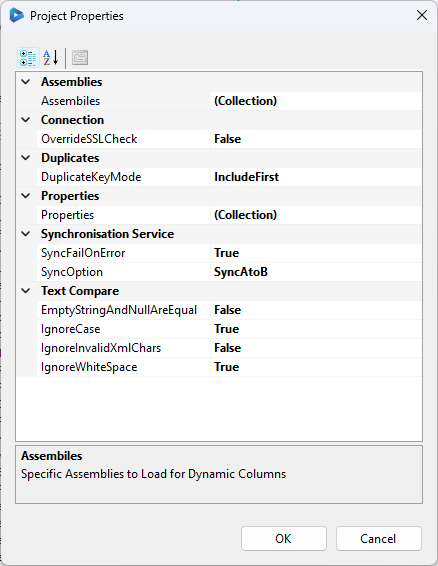
Assemblies
This allows you define extra external .NET Assemblies to load into the current app domain on project load.
OverrideSSLCheck
This is used to disable SSL Certificate checking. If True is selected then it will accept all certificates.
Duplicate Key Mode
This determines how duplicate keys are handled.
- IncludeFirst will include the first result and exclude any after that.
- RemoveAll will remove all duplicate key values.
Properties
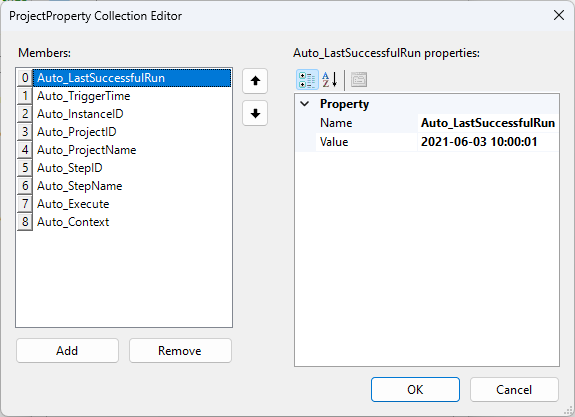
Properties are a Collection of Key/Value pairs that you can add to your Project. These are useful in Dynamic Columns and Project Automation where you want to store configuration values that can be changed easily by the user.
If you open your project from Ouvvi, there are a series of default properties added to the project. These automatic properties can be seen in the image below.
SyncFailOnError
If True (default) causes the Sync to fail on the first error. If you want the sync to continue even if there is an error then change this to False.
Setting this to false can be useful when trying to diagnose which records are causing problems. After you have run the synchronisation, you can run the compare again to preview the data not synchronised. These will be the records causing an issue and you can scroll thorough the preview investigate further as to why.
SyncOption
Sets the Sync Mode of operation to one of the supported sync modes.
- SyncAtoB - (default) Sync from DataSource (A) to DataSource (B).
- SyncAtoBIncremental - Sync from DataSource (A) to DataSource (B) in Incremental Mode.
IgnoreCase
If True (default), this causes the compare engine to ignore case differences in string data.
EmptyStringAndNullAreEqual
If True (default), Empty Strings and NULL values are the same.
IgnoreInvalidXmlChars
If True (default), this causes the compare engine to strip out invalid XML characters before comparing string data.
Uses the following RegEx expression to remove invalid Xml Characters.
[^\x09\x0A\x0D\x20-\xD7FF\xE000-\xFFFD\x10000-x10FFFF]
IgnoreWhiteSpace
If True (default), this causes the compare engine to ignore any white-space differences in string data.