Parameters
You can add parameters by right clicking onto the parameters folder in the tree and selecting Add Parameter.
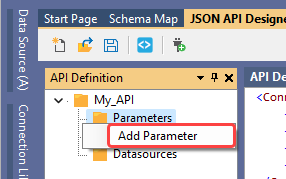
This will add a line beneath the parameters node, and you can define the parameter needed.
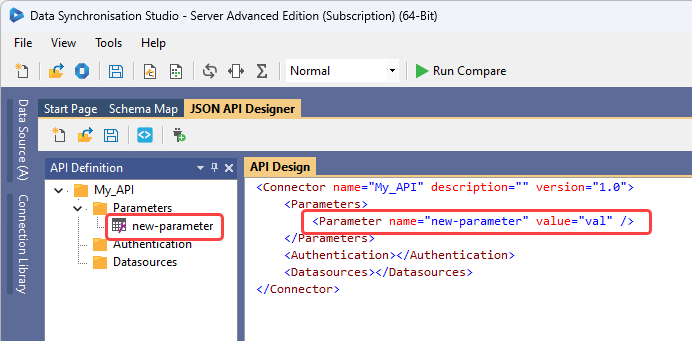
You will need to list the name and for the value you can either hard code a value or you can use a placeholder for the value to be injected at run time. Note that the name will be reflected in the tree under the parameter folder.
PageSize Parameter Example
Parameters can act as definitions for placeholders within other functions of the XML document. For example you can define a parameter for the page size of the paging requests. This would look like:
<Parameters>
    <Parameter name="URL" value="https://demo.online.simego.com" />
    <Parameter name="PageSize" value="10" />
</Parameters>
And would be referenced in the request with the place holder {PageSize}.
For example in the GetDataTable function and within the Fetch request of the PagingRequest node shown below:
<Action name="GetDataTable">
<!-- First get a List of Supplier ID values -->
<Fetch url="{URL}/app/list/suppliers?columns=SupplierID&limit=1000">
<!-- For Each SupplierID get the related Products -->
<ForEach path="data">
<!-- Handle Paging for the Product List -->
<PagingRequest path="data" start="1" next-path="nextpage">
<Fetch url="{URL}/app/list/products?filter=SupplierID%20eq%20{$SupplierID}&limit={PageSize}&page={PagingRequest.Page}">
<DataTableTransform path="data" />
</Fetch>
</PagingRequest>
</ForEach>
</Fetch>
</Action>